
Vulnerability Scans and a Single Device Scope: Examining A System Security Plan Example
Your System Security Plan needs to tell your compliance story. We often encounter small micro-businesses who may have just a few single laptops. These companies often rely on FedRAMP File Sharing services due to the lower start up costs. Yes, a GCCH environment may have lower costs over 2-3 years, but these contractors live RFP by RFP and do not have the CAPEX to budget three years out.
They also want to inherit as many controls as possible. Utilizing a FedRAMP authorized or equivalent File Share a small contractor has less of a compliance burden than maintaining a GCCH tenant.
Companies with one in scope user want to stay nimble and small. This means not adding a third party vulnerability tool. Yet sometimes assessors more familiar with larger environments may grow suspicious to this approach. They may not know applications on the device can get scanned. They probably do not have a handle on all the Microsoft Defender product lines or the features of Microsoft Entra.
You can not bemoan the ignorance (at least during an assessment) of a CCA. Instead assume your audience knows nothing. Use the System Security Plan to remove any need for an assessor to make an inference. Spell out all your components and how they get deployed.
We divide the SSP into two parts: a narrative front matter and a spreadsheet of 320 implementation statements at the objective level. For micro-businesses we encourage them to list all compliant procedures directly in the implementation statements. A single device contractor does not need 14 policies, 14 plans, and umpteen Standard Operating Procedures. Outside of key inventory documents all procedures can live directly in your System Security Plan
You need to beat assessors over the head with your design decisions and constantly remind them of why you have the depth and breadth in your controls to meet the NIST-SP-800-171 security controls. The assessor must walk way thinking yoru controls provide adaquete and sufficient coverage.
Use the SSP front matter to your advantage. Spell out the decisions you made. Let us look at a fictional company Asterion Systems
2.3 System Environment
Asterion Systems is a fully remote organization with no corporate office, corporate local-area network, on-premises server, cloud-hosted server, domain controller, network printer, or custom-developed application. The Asterion Systems Secure Enclave is intentionally limited to one company-owned and company-managed Microsoft Windows 11 Pro laptop and the cloud services that store, transmit, or protect CUI and ITAR-controlled technical data. The physical boundary is defined at the in-scope laptop and moves with that device when it is used at an approved remote work location.
The in-scope laptop is the only company endpoint authorized to access, process, temporarily store, or transmit CUI or ITAR data. It is Microsoft Entra joined, enrolled in Microsoft Intune, and hardened to a documented customized configuration baseline derived from the CIS Microsoft Windows 11 Level 2 Benchmark and the applicable Microsoft Implementation Guidelines. When the two sources prescribe different values for the same security setting, Asterion Systems adopts the more stringent setting unless a documented operational exception and risk acceptance have been approved. Baseline compliance is monitored through Intune, Defender, and retained configuration evidence.
Microsoft 365 Business Premium provides the organization’s commercial productivity tenant, Entra identity services, Intune endpoint management, and Defender for Office protections. The licensed security add-on provides Microsoft Defender for Endpoint Plan 2 for the managed laptop. Microsoft 365 Commercial, including OneDrive and SharePoint, is not authorized to store CUI or ITAR data under this architecture. Automatic saving and synchronization of CUI to OneDrive or SharePoint are disabled, and users are prohibited from placing CUI in unauthorized Microsoft 365 applications or locations.
The authorized FedRAMP High file-sharing service is the system of record for CUI and ITAR data and the approved channel for controlled external transfer. Provider-operated infrastructure, platform services, physical facilities, and provider patching are addressed through the provider’s FedRAMP authorization package and customer-responsibility documentation. Asterion Systems remains responsible for account approval, access configuration, endpoint security, data handling, monitoring, vulnerability review, remediation, and retention of evidence for the portions of the system it administers.
Government-Furnished Equipment (GFE) used by contractors connects only to Government systems and is not administered by Asterion Systems. GFE is not permitted to access Asterion Systems Microsoft 365 or the FedRAMP High file share. Contractor-owned BYOD devices are limited to approved FCI-only activity in Microsoft 365 Commercial and are prohibited from accessing, downloading, processing, or storing CUI. No CUI printing or network printing is authorized.
2.4 System Overview
The Secure Enclave uses a narrow endpoint-and-cloud architecture. Security services that protect the endpoint or identity plane are treated as security protection assets within the assessment scope to the extent that their correct operation affects CUI confidentiality.
2.4.1 Architecture and Boundary
The one hardened laptop is the sole company-controlled CUI asset. The FedRAMP High file share is the authorized CUI repository and transfer service. Entra, Intune, Microsoft Defender, Defender for Office, and Huntress provide identity, configuration, endpoint protection, monitoring, and response functions. The home router and public Internet provide transport only and do not establish trusted boundary protections; the endpoint firewall, device configuration, identity controls, application controls, and encrypted application sessions protect the system regardless of the remote network used. GFE, BYOD, Government systems, Microsoft 365 Commercial storage, printers, removable media, and unauthorized applications remain outside the CUI enclave and may not receive CUI.
2.4.2 Identity Components and Multifactor Authentication
Microsoft Entra provides the cloud identity for the authorized user, device registration and join state, role assignment, sign-in logging, and Conditional Access enforcement. Asterion Systems assigns a unique daily-use identity and uses a separate privileged identity for administrative actions. Conditional Access requires MFA for interactive access to Microsoft cloud resources and restricts access based on the managed and compliant status of maintained, are separately protected and monitored. Access to the FedRAMP High file share also requires an individually assigned account and MFA through Entra federation or the provider’s approved MFA service. Access is limited to authorized U.S. persons when required for ITAR data. The user has two accounts for privileged access for Microsoft 365 and for administering the FedRAMP High file sharing service.
2.4.3 Endpoint Detection and Response
Microsoft Defender for Endpoint Plan 2 is onboarded to the managed Windows laptop and serves as the endpoint detection and response capability. Defender Antivirus operates in active mode with cloud-delivered protection, behavior monitoring, tamper protection, attack-surface-reduction controls, endpoint firewall enforcement, and EDR telemetry enabled according to the approved baseline. Alerts and incidents are reviewed through the Microsoft Defender portal and the integrated monitoring workflow. The organization investigates detections, isolates the device when warranted, documents response actions, and validates recovery before returning the laptop to normal CUI use..
2.4.3.1 Defender for Office
Microsoft Defender for Office protects the Microsoft 365 email and collaboration environment using the capabilities included in the purchased plan. Asterion Systems relies on including anti-phishing, anti-malware, Safe Links, and Safe Attachments policies as part of the endpoint protection plan. Defender for Office does not make Microsoft 365 Commercial an authorized CUI repository. CUI and ITAR files must remain in the FedRAMP High file share, and links or attachments that would copy CUI into Exchange, Teams, OneDrive, or SharePoint are prohibited.
2.4.5 Security Information and Event Management
Huntress Managed SIEM provides centralized security monitoring for the in-scope environment. The Huntress endpoint agent collects supported Windows security and operational telemetry from the laptop and transmits it to the Huntress cloud service using the vendor-approved encrypted connection. Microsoft 365 and security-product audit sources are connected where supported. The FedRAMP High file share is configured to provide authentication, administration, file-access, and transfer audit events to Huntress through the provider-supported integration shown in the system diagram. Huntress correlates events, identifies suspicious activity, generates alerts, and supports investigation. Asterion Systems reviews escalations, records decisions and actions, and retains incident and monitoring evidence according to policy.
2.4.6 Identity Threat Detection and Response
Huntress Managed ITDR monitors the Microsoft 365 and Entra identity environment for suspicious account activity and security-relevant configuration conditions. The integration uses an approved application identity with only the permissions required for the service and relies on Microsoft 365 audit logging. Huntress analyzes identity and tenant events, generates managed detections, and provides guided remediation when activity indicates account compromise, unauthorized privilege or configuration change, MFA weakness, or other identity risk. Asterion Systems validates each escalation, disables or contains affected identities when required, resets credentials and sessions, corrects configuration weaknesses, and documents closure. Huntress ITDR supplements but does not replace Entra access controls or Asterion Systems' account-management responsibilities.
2.4.7 Vulnerability Scanning and Management
Microsoft Defender Vulnerability Management capabilities included with Defender for Endpoint Plan 2 are used for the in-scope laptop. The onboarded Defender for Endpoint sensor continuously discovers the device’s installed software and evaluates known software vulnerabilities and security misconfigurations. The service provides device and software inventory, vulnerability and configuration assessment, risk-based prioritization, continuous monitoring, and remediation tracking. This endpoint architecture does not rely on server scanning, virtual-machine scanning, Defender for Servers, or an agentless cloud-server scanner.
Automation does not complete Asterion Systems' vulnerability-management responsibility. The designated administrator reviews Defender findings at least monthly and when Microsoft, CISA, a software vendor, the file-share provider, Huntress, or another authoritative source identifies a new vulnerability that may affect the system. Findings are dispositioned in a ticket or vulnerability register; remediation, mitigation, approved risk acceptance, and false-positive decisions are documented; and rescans or device evidence are used to validate closure. Reports, software inventories, recommendations, tickets, exceptions, and validation results are retained as assessment evidence. Under this defined one-endpoint architecture, a separate third-party vulnerability scanner is not required while the endpoint remains fully onboarded and licensed and this review process is performed.
Organization-Defined Vulnerability Management Parameters
| Parameter | Organization-Defined Value |
|---|---|
| Periodic vulnerability scanning frequency | Continuous assessment while the in-scope endpoint is online, with results reviewed and documented at least weekly. |
| New-vulnerability trigger | A newly published vulnerability, addition to the CISA Known Exploited Vulnerabilities Catalog, Microsoft or vendor advisory, Defender alert, Huntress notification, or other credible threat intelligence that may affect the system or an installed application. |
| Known-exploited, actively exploited, or critical vulnerability remediation | Within 72 hours after the organization determines that the vulnerability affects the in-scope endpoint or an installed application. |
| High-risk vulnerability remediation | Within 14 calendar days after the organization determines that the vulnerability is applicable. |
| Moderate-risk vulnerability remediation | Within 30 calendar days after the organization determines that the vulnerability is applicable. |
| Low-risk vulnerability remediation | Within 90 calendar days after the organization determines that the vulnerability is applicable. |
| Failed sensor or interrupted assessment response | Investigated within one business day after the interruption is identified. |
| Remediation validation | Successful remediation is confirmed using installation, version, update, or configuration evidence and updated Microsoft Defender Vulnerability Management results. |
2.4.8 Patching and Update Management
Intune policies and Windows Update for Business controls manage Windows quality, feature, driver, and Microsoft product updates on the laptop. Update rings define deployment timing, deadlines, restart behavior, and reporting. Microsoft Edge and Microsoft 365 Apps use their approved managed update mechanisms; authorized third-party applications use vendor-supported update tools or are manually updated or removed when Defender identifies an exposure. Critical or actively exploited vulnerabilities are expedited according to the vulnerability-management and change-management procedures. The administrator reviews update compliance, investigates failed or pending installations, records exceptions, and confirms remediation in Defender or Intune.
Asterion Systems inherits the secure development, testing, publication, and distribution of Microsoft updates from Microsoft and the patching of provider-operated FedRAMP High file-share infrastructure from the file-share provider. These inherited functions do not transfer responsibility for configuring update policy, maintaining the laptop, approving operational exceptions, installing applicable third-party updates, or retaining evidence that the endpoint is current.
2.4.9 Encryption and Authorized CUI Data Flow
The laptop uses full-volume BitLocker encryption with TPM protection and recovery-key escrow under administrative control. CUI is downloaded only when required for an authorized business purpose and any local copy remains on the encrypted managed volume. CUI is not synchronized to OneDrive or SharePoint, copied to BYOD or GFE, stored on removable media, sent through ordinary email, or printed. The FedRAMP High provider encrypts CUI at rest within its authorized boundary and applies the provider’s approved key-management controls.
CUI and ITAR data move between the Prime CUI Portal, the hardened laptop, and the FedRAMP High file share only through authenticated HTTPS sessions using TLS 1.2 at minimum and TLS 1.3 when supported and negotiated by both endpoints. External release occurs only through the file share’s authenticated restricted-transfer workflow to an authorized recipient, including U.S.-person restrictions where required. Access controls, audit logging, expiration, revocation, and transfer records are enabled according to provider capability and Asterion Systems policy.
3.0 System Boundary Diagram
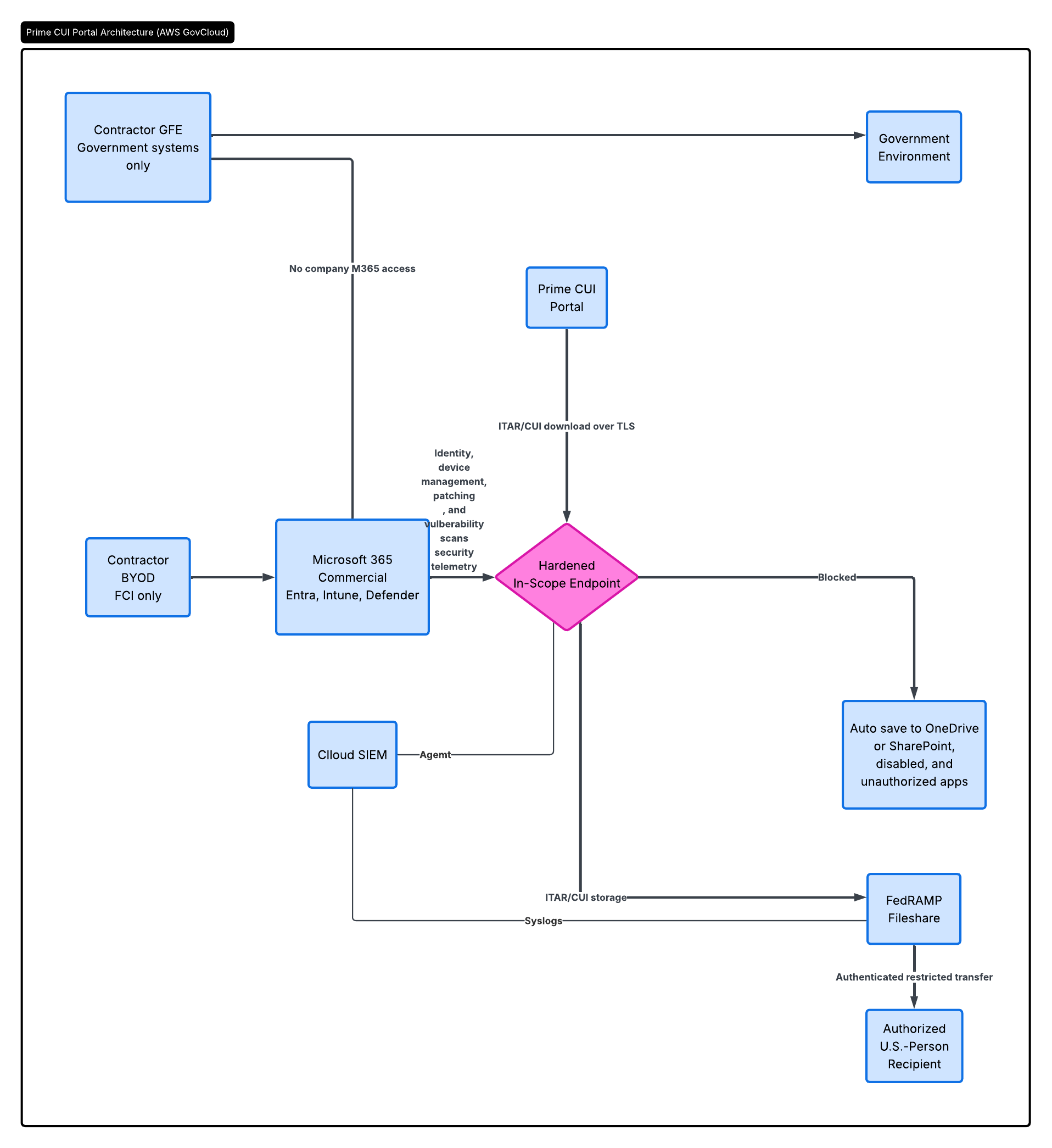
Then in your implementation statements explain how you enforce the systems described in your SSP front matter
3.11.2 — Vulnerability Scanning
Security requirement: Scan for vulnerabilities in organizational systems and applications periodically and when new vulnerabilities affecting those systems and applications are identified.
3.11.2[a] — Vulnerability Scanning Frequency Is Defined
Assessment objective: Determine if the frequency to scan for vulnerabilities in organizational systems and applications is defined.
Implementation statement: The organization defines vulnerability scanning as the continuous assessment performed by Microsoft Defender for Endpoint and Microsoft Defender Vulnerability Management while the in-scope Windows laptop is powered on, connected to the internet, and communicating with the Microsoft Defender service. Vulnerability and configuration assessment results are reviewed and documented by the designated Security Administrator at least weekly.
The defined vulnerability-scanning scope includes:
- The Windows operating system on the in-scope laptop.
- Microsoft and third-party applications installed on the laptop.
- Installed software versions and associated known vulnerabilities.
- Missing operating-system and application security updates.
- Unsupported or end-of-life software.
- Security configuration weaknesses affecting the endpoint.
- Microsoft Defender security recommendations applicable to the endpoint.
Event-driven vulnerability assessment is also required whenever a newly disclosed vulnerability may affect the Windows operating system, a system component, or an installed application. Triggering events include Microsoft or vendor security advisories, additions to the CISA Known Exploited Vulnerabilities Catalog, Microsoft Defender alerts, Huntress notifications, and other credible vulnerability or threat information.
The organization has no servers, network printers, custom-developed applications, or organization-managed network infrastructure within the CUI environment. Provider-owned infrastructure supporting Microsoft 365 GCC High and the FedRAMP High file-sharing service is scanned and maintained by the applicable cloud service provider. The organization verifies this inherited responsibility through applicable FedRAMP authorization documentation, customer responsibility matrices, service descriptions, contracts, and provider security communications.
3.11.2[b] — Organizational Systems Are Scanned at the Defined Frequency
Assessment objective: Determine if vulnerability scans are performed on organizational systems with the defined frequency.
Implementation statement: The in-scope Windows laptop is onboarded to Microsoft Defender for Endpoint and continuously assessed through Microsoft Defender Vulnerability Management. Defender collects operating-system, software, configuration, update, and exposure information whenever the laptop is online. Defender correlates this information with current Microsoft vulnerability and threat intelligence to identify known vulnerabilities, missing updates, and configuration weaknesses affecting the system.
At least weekly, the Security Administrator:
- Confirms that the in-scope laptop appears in the Microsoft Defender device inventory.
- Verifies that the laptop has recently communicated with the Defender service.
- Reviews the endpoint’s onboarding status and Defender sensor health.
- Reviews identified CVEs, exposed-device results, missing updates, security recommendations, and configuration weaknesses.
- Compares current findings with the results of the previous review.
- Creates or updates remediation tickets for actionable vulnerabilities.
- Confirms that open findings remain within the organization-defined remediation periods.
- Records the review date, reviewer, findings, applicability decisions, assigned actions, responsible person, and remediation due dates in the vulnerability management log.
If the laptop does not report current vulnerability information, the Security Administrator investigates the interruption within one business day. The Security Administrator documents the interruption, restores Defender sensor health or service connectivity, and confirms that vulnerability assessment results resume before closing the administrative ticket.
3.11.2[c] — Applications Are Scanned at the Defined Frequency
Assessment objective: Determine if vulnerability scans are performed on applications with the defined frequency.
Implementation statement: Microsoft Defender Vulnerability Management continuously inventories Microsoft and third-party applications installed on the in-scope laptop and evaluates installed application versions against known vulnerability information. Application assessment includes Microsoft 365 desktop applications, supported web browsers, document and PDF utilities, endpoint security software, file-sharing client components, and all other authorized software installed on the laptop.
During the weekly vulnerability review, the Security Administrator:
- Reviews the Microsoft Defender software inventory.
- Identifies applications associated with known CVEs or missing security updates.
- Identifies unsupported or end-of-life applications.
- Confirms that installed applications are authorized.
- Determines whether reported vulnerable application versions are installed on the endpoint.
- Opens remediation tickets for applicable findings.
- Updates, removes, disables, or replaces unauthorized, unsupported, unnecessary, or vulnerable software as appropriate.
- Documents the application vulnerability review in the vulnerability management log.
The organization does not develop or maintain custom applications. Provider-owned Microsoft 365 GCC High and FedRAMP High file-sharing applications are assessed by their respective cloud service providers. The organization remains responsible for locally installed clients, browsers, browser extensions, endpoint applications, and customer-controlled service configurations.
3.11.2[d] — Systems Are Scanned When New Vulnerabilities Are Identified
Assessment objective: Determine if vulnerability scans are performed on organizational systems when new vulnerabilities are identified.
Implementation statement: When a newly disclosed vulnerability may affect Windows or another system-level component, the Security Administrator performs an event-driven applicability assessment without waiting for the next weekly review.
The Security Administrator:
- Records the vulnerability source, CVE or finding identifier, publication date, and organizational review date.
- Determines whether the affected Windows version, operating-system component, driver, firmware, or security feature is present on the in-scope laptop.
- Confirms that the endpoint is online and reporting current Defender telemetry.
- Reviews Microsoft Defender weaknesses, exposed-device results, security recommendations, and threat analytics.
- Determines whether Microsoft has incorporated the vulnerability into Defender Vulnerability Management.
- Determines whether the in-scope laptop is affected.
- Documents the basis for the applicable or not-applicable determination.
- Assigns an organizational risk rating and remediation deadline when the vulnerability is applicable.
- Opens a remediation ticket and begins corrective action.
If Microsoft Defender has not yet incorporated a credible vulnerability into its assessment content, the Security Administrator manually tracks the vulnerability using authoritative vendor information, installed-version information, and direct configuration inspection. Manual tracking continues until the vulnerability is remediated, determined not applicable, or incorporated into an authoritative detection method.
A Microsoft Defender Antivirus malware scan is not treated as a substitute for vulnerability assessment.
3.11.2[e] — Applications Are Scanned When New Vulnerabilities Are Identified
Assessment objective: Determine if vulnerability scans are performed on applications when new vulnerabilities are identified.
Implementation statement: When a new vulnerability is reported for an application that may be installed on the in-scope laptop, the Security Administrator performs an event-driven application assessment without waiting for the next weekly review.
The Security Administrator:
- Records the CVE or finding identifier, affected application, affected versions, authoritative source, publication date, and organizational review date.
- Compares the affected product and versions with the Microsoft Defender software inventory and Intune application inventory.
- Confirms that the endpoint has recently communicated with the Defender service.
- Searches Defender Vulnerability Management for the applicable CVE, application weakness, exposed-device result, or security recommendation.
- Verifies the locally installed application version when necessary.
- Documents whether the affected application and version are installed and whether the vulnerability is applicable.
- Assigns an organizational risk rating and remediation deadline for each applicable vulnerability.
- Updates, removes, disables, or replaces the vulnerable application within the applicable organization-defined remediation period.
- Retains the basis for any not-applicable determination.
If an application vulnerability is not yet represented in Microsoft Defender, the organization manually evaluates the installed application version against the vendor advisory. The finding is manually tracked until the application is remediated or authoritatively determined not applicable.
3.11.3 — Vulnerability Remediation
Security requirement: Remediate vulnerabilities in accordance with risk assessments.
3.11.3[a] — Vulnerabilities Are Identified
Assessment objective: Determine if vulnerabilities are identified.
Implementation statement: The organization identifies vulnerabilities through continuous Microsoft Defender Vulnerability Management assessment, weekly administrative reviews, Microsoft threat intelligence, the CISA Known Exploited Vulnerabilities Catalog, vendor security advisories, Huntress notifications, Intune compliance and update reports, and cloud service provider security notifications.
For every potentially applicable vulnerability, the Security Administrator:
- Records the CVE or finding identifier.
- Identifies the potentially affected operating system, application, software version, component, or configuration.
- Records the vulnerability source and identification date.
- Confirms whether the affected component is present in the environment.
- Determines whether the vulnerability is applicable.
- Evaluates CVSS severity, exploit availability, active exploitation, CISA KEV status, endpoint exposure, potential impact to CUI, and existing safeguards.
- Assigns an organizational risk rating.
- Establishes the required remediation deadline based on the assigned risk.
- Creates a remediation ticket for each applicable finding.
- Retains the basis for each not-applicable determination.
Provider-owned vulnerabilities affecting Microsoft 365 GCC High and the FedRAMP High file-sharing service are managed by the applicable cloud service provider. The organization reviews provider notifications and inherited-control documentation to identify customer actions, configuration changes, or security events that may affect its authorized use of those services.
3.11.3[b] — Vulnerabilities Are Remediated in Accordance with Risk Assessments
Assessment objective: Determine if vulnerabilities are remediated in accordance with risk assessments.
Implementation statement: The organization remediates identified vulnerabilities according to the risk assigned during the vulnerability assessment.
- Known-exploited, actively exploited, or critical vulnerabilities are remediated within 72 hours after applicability is determined.
- High-risk vulnerabilities are remediated within 14 calendar days after applicability is determined.
- Moderate-risk vulnerabilities are remediated within 30 calendar days after applicability is determined.
- Low-risk vulnerabilities are remediated within 90 calendar days after applicability is determined.
The Security Administrator may shorten a remediation period based on CISA KEV status, evidence of active exploitation, availability of public exploit code, endpoint exposure, potential access to CUI, or the absence of effective mitigating safeguards.
Remediation is performed through Intune, Windows Update for Business, Microsoft Update, Microsoft Defender remediation actions, vendor-supported application updates, configuration correction, feature disablement, application removal, or product replacement.
For each applicable vulnerability, the organization:
- Confirms the vulnerability and its assigned organizational risk.
- Creates a remediation ticket containing the identification date, risk rating, remediation deadline, affected asset or application, and responsible person.
- Selects and documents the corrective action.
- Applies the update, removal, replacement, or corrective configuration within the applicable organization-defined remediation period.
- Restarts the endpoint when required to complete remediation.
- Confirms successful installation or configuration through Intune, Windows update history, installed application-version information, or direct configuration inspection.
- Confirms that Microsoft Defender Vulnerability Management no longer reports the endpoint as exposed to the vulnerability.
- Attaches remediation and validation records to the ticket.
- Closes the finding only after remediation has been verified.
If remediation cannot be completed within the applicable period, the issue is escalated to organizational leadership before the deadline. The organization restricts or suspends CUI processing on the affected endpoint until the vulnerability is eliminated or an effective temporary safeguard is implemented.
Temporary mitigation, documented risk acceptance, or entry of a vulnerability into a Plan of Action and Milestones does not constitute permanent remediation while the underlying vulnerability remains present. The organization continues to track the vulnerability until permanent remediation is completed and validated.
These implementation statements might seem longer than usual. As a micro-business Asterion Systems tries to keep documentation to a minimum so all procedures got spelled out in the System Security Plan.
These procedures can probably get simplified, but this is a blog post, so not worth the effort to write shorter procedures.
Even with just a a single laptop, and using existing tools Asterion Systems realized vulnerability management required specialized help. They did not have the deep Defender and and Entra expertise needed. The monitoring and audit logging meant spening money on indirects and not charging customers for direct work. In the end Asterion Systems realized free got too expensive and they reached out to their MSP that sold them Huntress and revised the Service Level Agreement so they took over all vulnerability scans.