One Laptop Does Not Need an Enterprise Security Program
A one-person company struggles to prepare for CMMC. Often, folks begin in the wrong place.
All month long I am focusing on how a single-user company can create controls that meet NIST SP 800-171 security requirements and pass a CMMC assessment using the NIST SP 800-171A assessment objectives. You can find the first post here.
You download NIST SP 800-171. You see 110 requirements. You throw up in your mouth when you realize you must meet 320 assessment objectives. You have no employees. How can you meet requirements meant for a large enterprise?
You start hearing about policies, SIEMs, VLANs, vulnerability scanners, privileged access workstations, firewalls, incident response plans, configuration management boards, and a dozen other things that sound like they belong in a Fortune 500 company.
Before long, a founder with one laptop tries to design an enterprise security program.
Stop this backward approach.
Before we decide how to protect the system, we need to answer a much simpler question:
What exactly do we need to protect?
For a small contractor who runs staffing agencies and hires 1099 employees to work on GFE, the simplicity of the environment matters.
Start With the Business, Not NIST SP 800-171
We work with many companies that operate on similar principles.
One founder serves as the principal contractor. She has one company-controlled Windows laptop. Only this company device can process, store, or transmit Controlled Unclassified Information.
The company also uses 1099 contractors, but those contractors perform their government work onsite using Government-Furnished Equipment. Their GFE does not connect to the company’s systems. The company does not grant those contractors access to CUI.
For ordinary company communications and Federal Contract Information, the contractors may use their own devices to access Microsoft 365 Commercial. But that Microsoft 365 environment only touches FCI. Contractors cannot access the CUI repository.
The company realizes it has:
- no CUI printers,
- no company servers,
- no corporate LAN,
- no removable-media workflow for CUI, and
- no reason to drag every device the company touches into the CMMC boundary.
Your Company Does Not Automatically Equal Your CMMC Boundary
A small business may own or interact with all kinds of technology. That does not mean all of it has to become part of the system that handles CUI. Our founder may use a personal phone. The 1099 contractors may own laptops and tablets. The Government may provide computers. The company may have a commercial Microsoft 365 tenant. T he founder may have a home router. None of those facts automatically place all of those devices inside the CUI environment.
As you start to scope a single-person company, begin with critical questions:
- Can the device process CUI?
- Can it store CUI?
- Can it transmit CUI?
- Does it provide security protection to the CUI environment?
Keep the CUI Workflow Small
Our boundary may look like this:
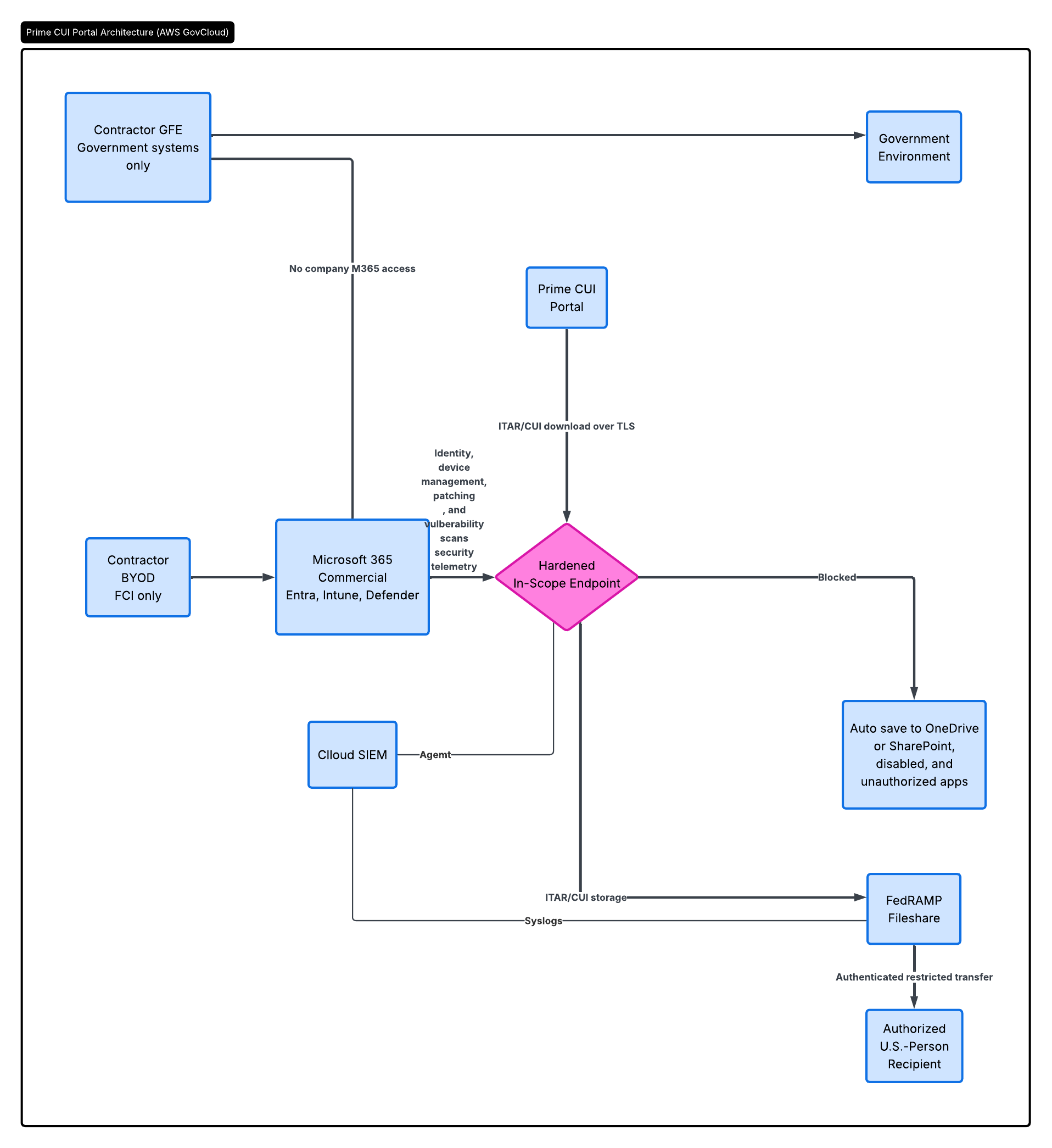
Or like this:
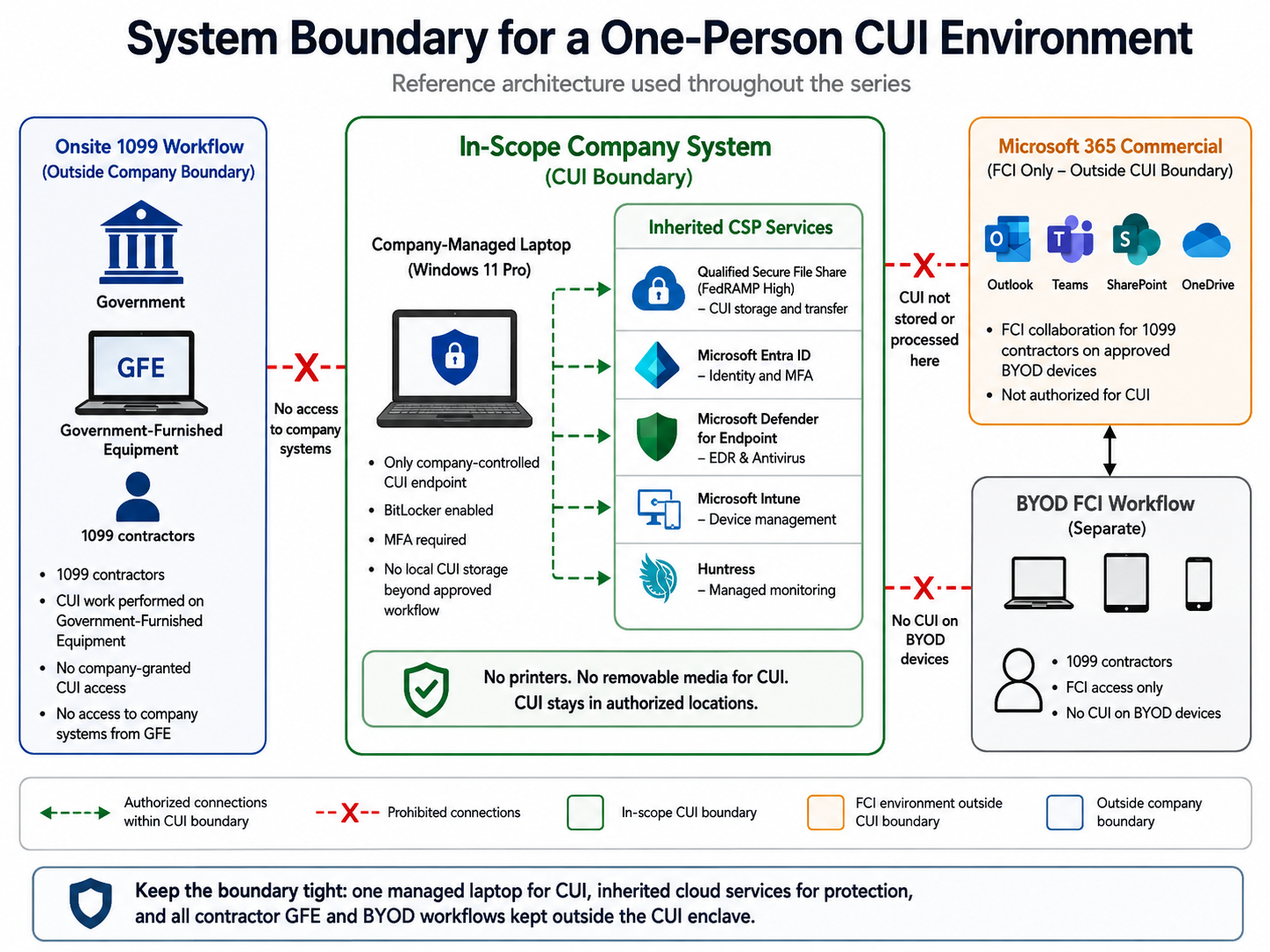
We keep the center of the diagram intentionally boring.
When you realize the scope involves a single company-managed Windows laptop, you can get a handle on CMMC. That laptop connects to the authorized services used to protect and handle CUI. Everything else gets separated by function. The Government-Furnished Equipment stays in the Government environment. The contractors' personally owned devices stay in the FCI workflow.
Microsoft 365 Commercial stays an FCI environment and provides SPA support as an External Connection.
The contractors never receive access to the CUI repository. CUI does not move onto their personal devices. CUI does not move onto the Government equipment through the company’s systems. CUI does not get printed.
The result:
CUI scope, Government systems, and ordinary FCI collaboration do not have to become one giant blob.
That makes both cybersecurity and CMMC easier.
Every Asset Has a Cost
A hidden cost appears every time you allow CUI onto another device. Suppose the founder decides to let a contractor download one CUI drawing onto a personal laptop. That sounds like one small workflow change.
No. We just added another device to our boring middle, and we increased scope.
Now we have another device that we may need to inventory, configure, harden, monitor, patch, protect, assess, and describe in the SSP. We need to know who administers it. We need to control access. We need to know where the file gets stored.We need to know whether it gets backed up.
We need to think about browser caches, temporary files, local accounts, malware protection, encryption, vulnerabilities, and incident response.All because we wanted to make one file easier to access. The same thing happens with printers.
If we do not print CUI, then we do not need to design procedures for protecting CUI sitting in an output tray, storing paper records, transporting hardcopy, sanitizing printer storage, or destroying printed CUI.
The simplest printer control for a tiny company:
Do not print CUI.
That gives us one of the most important lessons in this entire series:
Every asset you keep out of the CUI workflow is an asset you do not have to protect as part of the CUI system.
That does not mean ignoring security on the rest of the business.
FCI still has safeguarding requirements. Commercial systems still need security. Employees and contractors still need safe computing practices. It simply means that we should not unnecessarily turn every business system into a CUI system.
Draw the Boundary Before You Buy Anything
This is why I would not start a small company’s CMMC project by shopping for cybersecurity tools.
I would start with a diagram.
- Where does CUI come from?
- Where can it go?
- Who can see it?
- Which device can open it?
- Where can it be stored?
- How does it leave the company?
- What systems are expressly prohibited from receiving it?
If a founder cannot explain the boundary in plain English, you will struggle to write an accurate SSP around it.
If the assessor cannot understand the boundary, the assessment will get much more complicated.
The Boundary Builds a Business Rule
Technology alone will not keep this design small. The company also needs rules.
- The 1099 contractors do not get added to the CUI access group.
- The founder does not forward CUI to commercial email.
- Government-Furnished Equipment does not log into company systems.
- Personal devices do not download CUI.
Those operating decisions preserve the boundary.
What We Just Built for the SSP
We still have not written any of the 110 NIST SP 800-171 requirements.
But we have already created some of the most important content that will eventually go into the System Security Plan.
We now know:
- the system environment,
- the CUI system boundary,
- the physical and logical separation of the environment,
- the roles involved,
- who has authorization to access CUI,
- how CUI flows through the company,
- which assets and workflows remain outside the boundary,
- what systems cannot receive CUI, and
- which changes require us to reconsider scope.
That is why I wanted to start the series here.
If we get the boundary wrong, everything we build afterward gets harder.
If we get the boundary right, a one-person company can remain a one-person security problem instead of accidentally becoming an enterprise security problem.
When it comes time to write the System Security Plan, your boundary diagram will support many controls:
- 3.1.3 — The company limits CUI flow to the managed laptop and authorized CUI services.
- 3.1.20 — The diagram shows GFE, BYOD, and Microsoft 365 Commercial as external or out-of-boundary systems and documents restricted or prohibited CUI connectivity.
- 3.12.4 — The diagram documents the CUI system boundary and external connections.
- 3.13.1 — The diagram identifies the logical boundary between the CUI enclave, Government environment, BYOD environment, and commercial FCI environment.
- 3.13.6 — The diagram can mark prohibited paths and support the allow-by-exception architecture.
- 3.13.8 / 3.13.11 — The diagram can identify approved encrypted and FIPS-protected CUI connections. The boundary diagram exists to mainly meet 3.12.4, 3.13.1, and 3.1.3. It defines everything about CMMC
Next: Now We Can Buy Something