Fort Knox? No Kids? Physical Protection and the Home Headquarters
When a solopreneur reads NIST-SP-800-171 physical security controls you feel like folks protect Fort Knox.
Security badges, guards, cameras. You do not have any of those. You run a small company from home. You have one laptop, a cloud service provider, and a household full of devices that have nothing to do with your government contract.
Before buying cameras, badge readers, and burning tokens writing pages of policy and procedure. Think about the data. Where does CUI live? Who can reach it? Which physical safeguards do you operate, and which safeguards can you inherit? If you can keep your data encrypted end to end you can keep your physical security boundary small?
A small boundary will keep much of your home and household technology outside the CMMC assessment scope. By utilizing a hardened laptop, say Windows 11 with Bitlocker and FIPS encryption and then having encrypted data traveling Transport Layer Security (TLS), what you call the Internet, and then landing in a FedRAMP Authorized Cloud you can leave much of, technically all, your house out of scope.
Physical Security and the Home Business
You do not automatically remove every physical security responsibility at home by moving to a fully remote company. Under the CMMC Assessment Process, outside NIST-SP-800-171a objectives, the address of your CAGE code determines the Headquarters. When scoping a CMMC assessment environment you include the spaces that store, processes, and transmits CUI. Fully remote companies can define their boundaries at the endpoint but a solopreneur may end up with a home office in scope. It again, depends on the data flow.
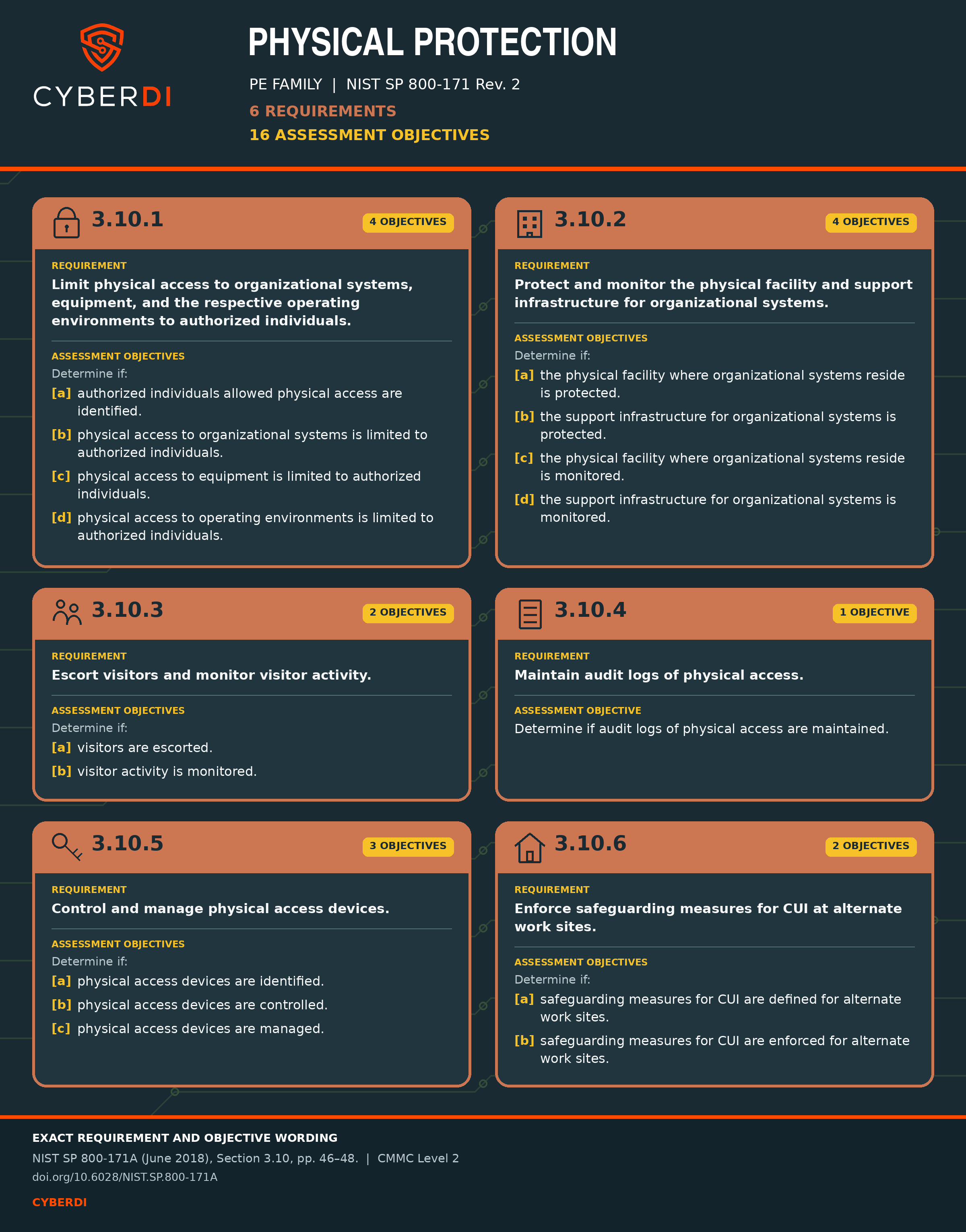
The Physical Security Family has six requirements. Across these your controls must address 16 assessment objectives. For many small businesses you may bring this home office on scope. Maybe you have a file cabinet for business records or get mail. Some of this physical media, while not controlled, could involve information about your federal contracts. Regardless, if your physical office comes into scope you do not have to bring your network, and thus physical protection of those devices in scope. You can
Boundary at the Device
For many work from home companies you have a fully remote environment. No physical devices outside a laptop and the company not does not allow the creation or possession of physical CUI.
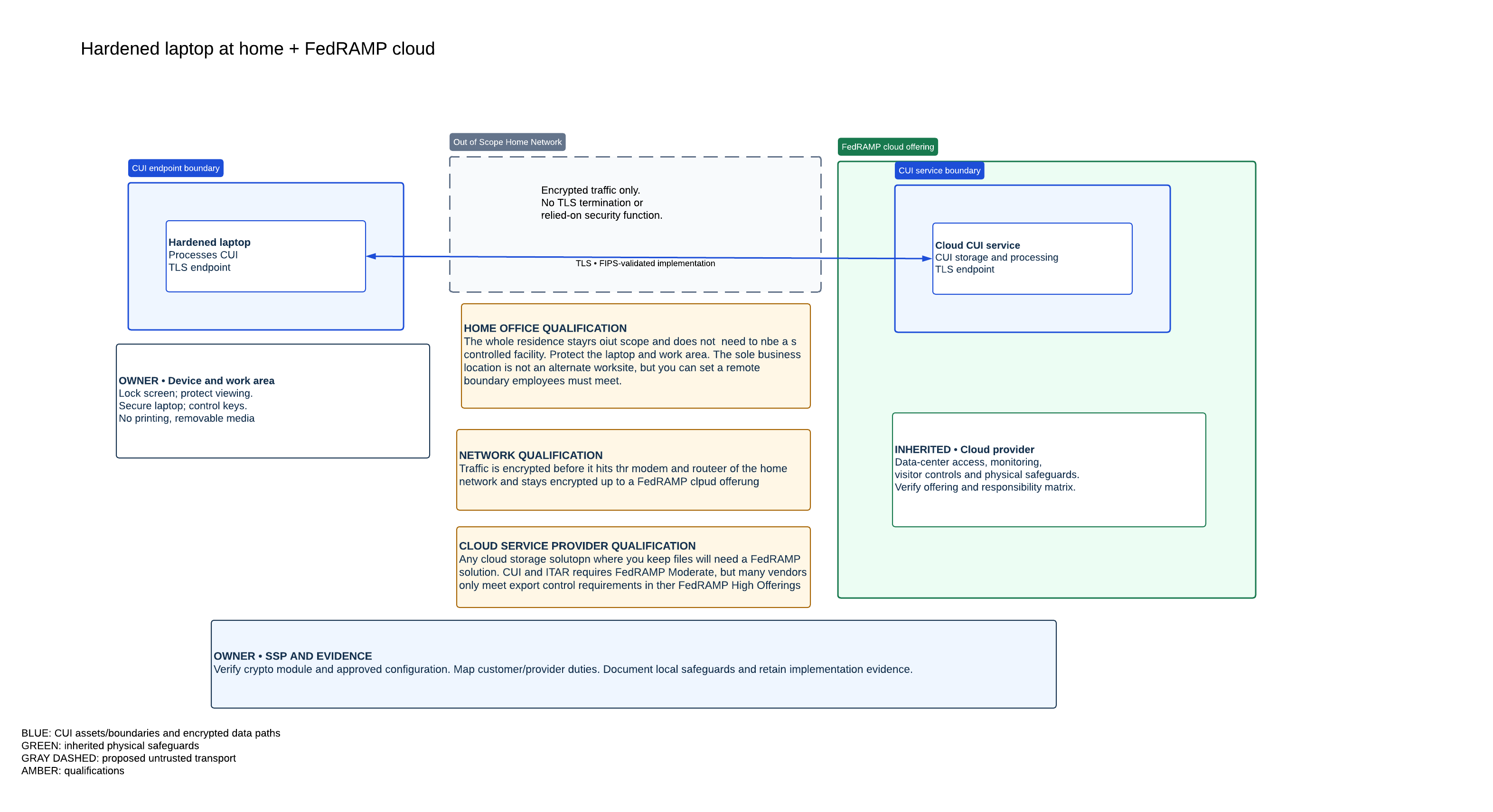
The laptop enforces the security boundary. For this example, its configuration includes a host firewall, restricted local network communications, full-disk encryption, endpoint protection, automatic screen locking, and controlled administrative access. The cloud service controls access at the other end.
This means you inherit almost all physical security controls from your CSP, or cloud service provider. Your laptop does not need a visitors' log. Your children do not need to sign in and out if they come in the office when you are not working. The Cloud Service Provider protects the physical security of where your data lives. You protect the physical security of your device.
TLS protects information as it travels between your device boundary and the CSP. The household Wi-Fi, router, and internet connection carry the encrypted traffic. They do not terminate the TLS session or receive readable copies of the files. Thus you can keep your home network out of scope as your CUI travels encrypted end to end.
Boundary at the Home Office
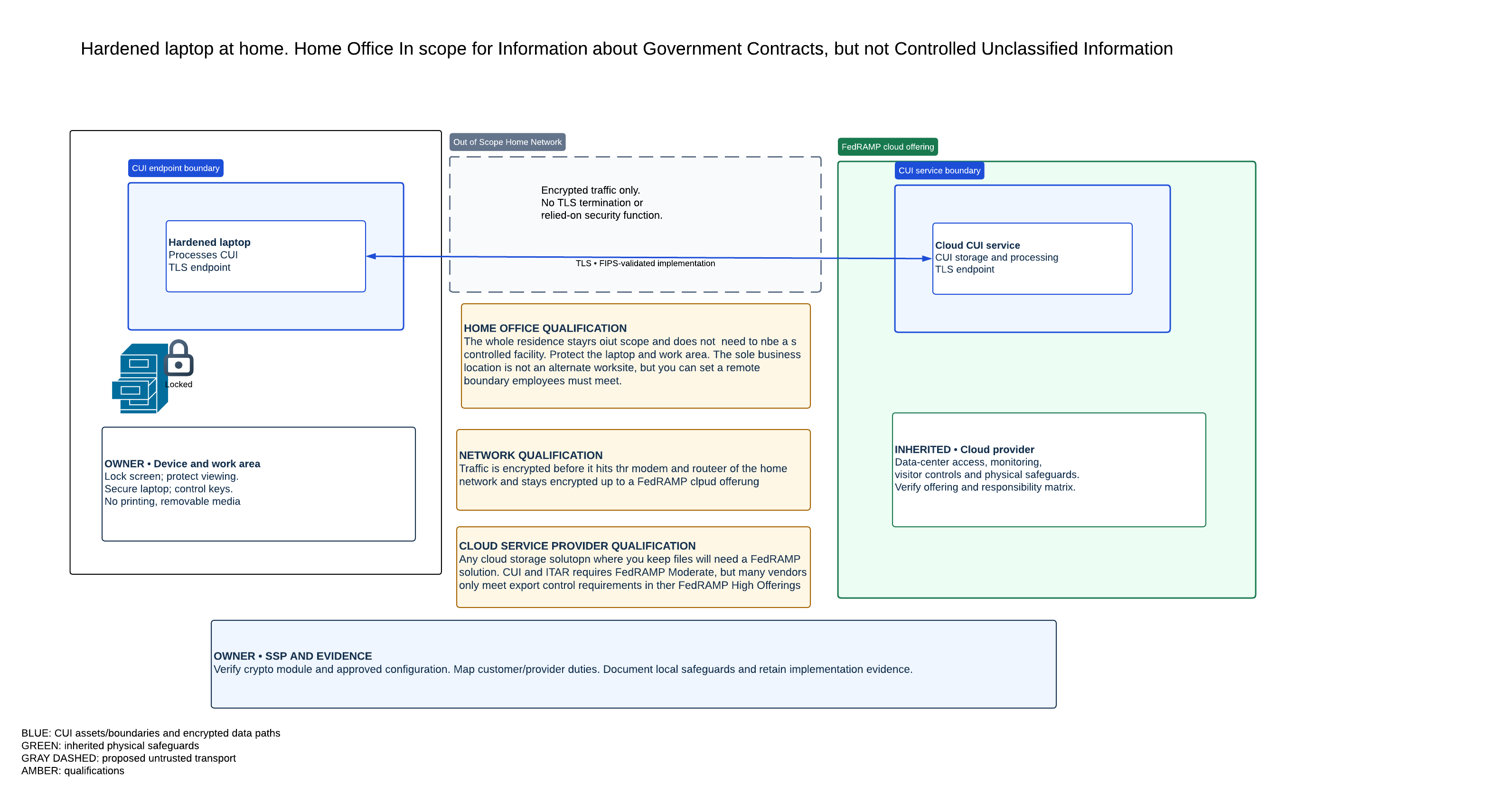
You may find benefits to scoping your home office and defining the boundary at a locked door rather than the device. This would allow you to store physical and digital media about your federal contracts that isn’t for public release. You might have business records outside the purview of the Government work you want to lock up. Bringing the home office in scope does not greatly increase your physical security requirements.
Just describe how you lock or shut the door during operations. Identify how you lock up the device when not in use. You still do not need visitor logs for the family, and will meet the requirements by inheriting controls from your CSP.
Network Equipment in Scope
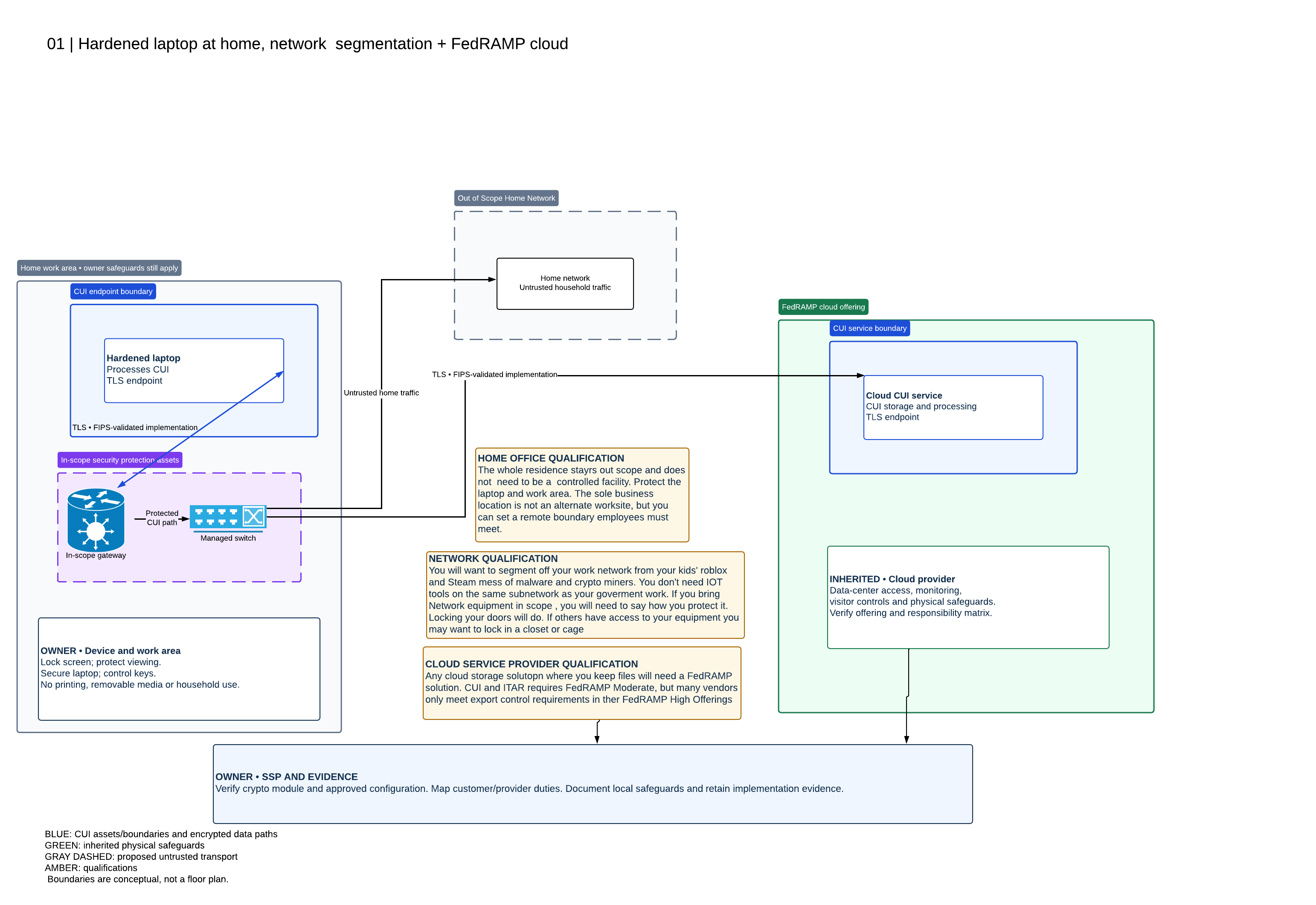
Even though you can keep your home network out of scope for a CMMC assessment, you should still use segmentation as a home office. You do not want your IOT listening speakers on the same network. You do not need to share resources with your kid’s compromised Roblox cryptominer box.
Given that you may use a gateway and a managed switch to create some distance between work and home, you may find benefits to bringing this network equipment in scope. You can meet many controls with your firewall rules. Most modern Gateways, routers, and switches collect important monitoring data.
If you do bring these network devices in scope you must document their physical protection. In a home office a locked door should suffice, but some may go a step further and throw the gear in a locked closet. You could order a small rack or locked cage. Probably unnecessary, but for under hundred bucks, securing the devices can appease an over zealous assessor. Sometimes we find it cheaper when tools come with an SAT: stupid assessor tax. Just risk management.
Server in Scope
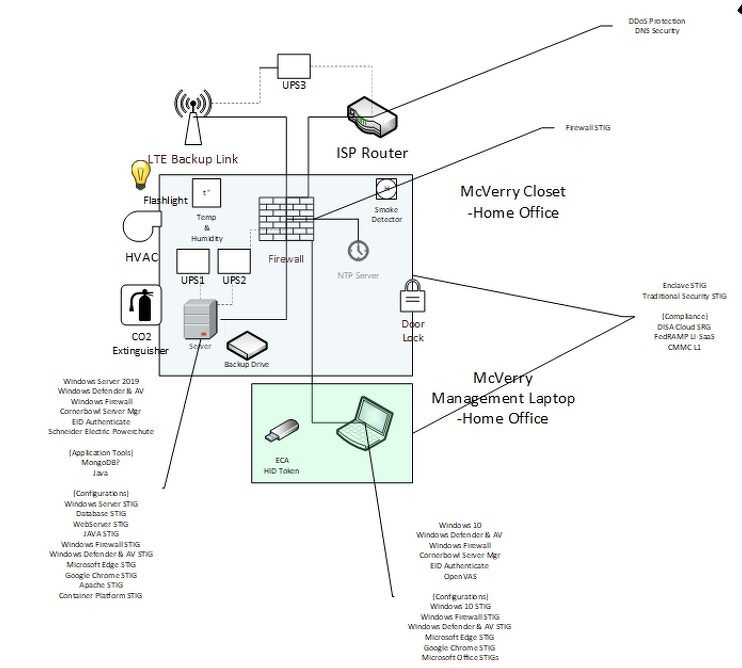
Some companies may have a server in scope at a home office. This changes the defined boundaries around your controlled environment. The protected area must now include the the server and its supporting infrastructure. Limit authorized access, protect and monitor the area, escort visitors, keep physical access records, and control keys or other access devices. NIST allows different implementation methods, including written access logs. Select methods appropriate to your actual environment. You may still exclude the rest of the house and household network through effective separation. But the room, equipment, and safeguards that support the server now form part of the implementation you must explain and demonstrate.
Consider the electrician, internet installer, cleaner, and repair technician. Explain who authorizes their entry, who supervises them, and where the access record lives. You can probably use an agent built into your CSP to convert calendar entries into a visitor log. Or just make a new calendar in Google to be your visitor log. It will so rarely happen.
You will need to extend the procedure to backup drives and failed disks. A copy of your backups should remain offsite and out of the cloud. Your physical security plan if you use hard off-site back ups must describe how and where these get protected. A drive awaiting replacement can still contain CUI. Physical protection and media protection continue while you store, move, repair, or dispose of equipment.
You may have to expect a CMMC assessor doing a site visit. Running network architecture is a vastly different scope than a fully remote business. If the home office contains a CUI server, printer, or stored paper records you need to document the physical boundaries of a controlled area and maintain access-record process covering the equipment and media.
Facility Clearance License
Many small organizations working from home, often those with network infrastructure in the house and doing Defense work, may have a Facility Clearance License or FCL. This means the contract they work on may require a Security Clearance.
As part of the process you document the physical security of your facility. For a fully remote company, or those with network infrastructure at a home address, this is the same physical footprint for the controlled environment. They may code low, and push high. This often means storing moderate. Use the same plan. An FCL can be contract driven, but that does not invalidate the physical security plan developed. Don’t redo work. If you have to maintain network segmentation to ensure environments do not co-mingle your physical security will already pass a moderate baseline. I would encourage a discussion with your C3PAO. If the physical security of your controlled environment is monitored by a designated FSO and no major changes in footprint have occurred, then maybe a video walkthrough should suffice?
Visitor Logs
| Situation | Recommended handling |
|---|---|
| Family or guests remain outside the protected work area | No business visitor-log entry because family entered the residence. Keep CUI and company equipment inaccessible to them. |
| A repair technician or other visitor enters the protected office | Record the visit, supervise the person, and secure CUI before entry. Locking the screen or shutting down the computer does not remove the need to control physical access to equipment. |
| The business prohibits visitors from entering the protected area | Document and enforce that restriction. Do not fabricate entries when no visits occur. Explain how you maintain the physical-access records applicable to that boundary. |
| The home office contains a CUI server, printer, or stored paper records | Establish a more formal controlled area and access-record process covering the equipment and media. |
Maintain Audit Logs
Verbs matter. In 3.10.4 you “Maintain Audit logs.” “Maintain” is your task. “Audit” is an adjective describing the logs. NIST-SP-800-171 rev 2 gives you leeway in defining audit logs. NIST-SP-800-171 rev 2 organization defined parameters set by the Department of Defense require a 45 day review period of physical access logs.
To maintain audit logs you can list any additional home security you provide for the family available areas such as alarm door bells or commercial video cameras. Every 45 days you can check off if these are still active. Ring doorbell still working? Check. You now maintain audit logs.
If you do need someone, say doing remodeling, to access the environment you can document alternative worksite procedures to remove CUI, or create an entry in your paper audit records: “Plumber needed access on May 6, 2025 all devices containing CUI were removed until pipes unclogged.”
If you have a server in your house or basement, your visitor logs, even if still paper should be more complete. A combination of Date ,visitor name/company, purpose,area accessed,arrival/departure,escort, and exceptions.
If you use an IT company to help support your environment like wiring your house, helping you with the server set up, you can issue permanent physical access authorization credentials but still log access. Just means you do not have to escort them in the basements to the entire time.
Going for the Gold
Turn on MFA, do not give daily driver accounts admin rights. That’s the best way to protect CUI and your business, but you still need to do address your physical security.
Keep it small and take the win.